
Best Creative Artist Companion: Wacom Cintiq Pro Series Review
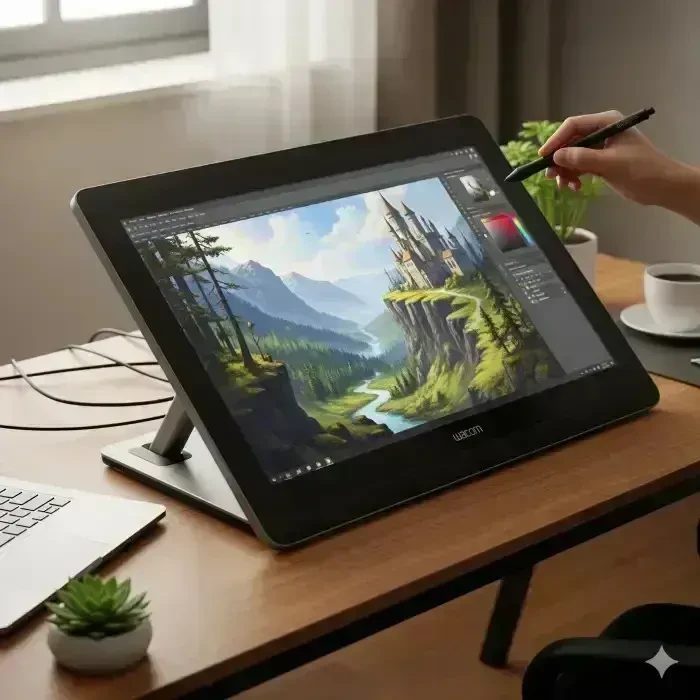 Wacom Cintiq Pro Series Review
Wacom Cintiq Pro Series: The Ultimate Tool for Digital Artists and Designers
Discover why the Wacom Cintiq Pro Series is the preferred choice for creative professionals worldwide and how it can elevate your art to a whole new level.
Introduction: Why the Cintiq Pro Series Matters
In today's digital art world, having a tablet that feels like an extension of your hand isn't just convenient?it's transformative. The Wacom Cintiq Pro Series is designed to do exactly that. It's more than just a drawing tablet; it's a creative hub where your ideas come to life with accuracy, colour fidelity, and responsiveness that feels natural. Whether you are a professional illustrator, concept artist, designer, or hobbyist looking to level up, the Cintiq Pro is engineered to meet your every creative need.
Imagine drawing on a tablet and seeing your strokes appear exactly as intendedWithout lag, with lifelike pressure sensitivity, and rich, accurate colours. That's what the Cintiq Pro delivers, and it's why top studios around the world rely on it for high-end creative projects.
Design and Build Quality: Sleek, Durable, and Comfortable
The first thing you notice about the Cintiq Pro is its premium design. Unlike many tablets that feel utilitarian, the Cintiq Pro combines elegance with ruggedness. Its slim, minimalist frame not only looks great on your desk but also makes it easy to reposition or transport if needed.
The etched glass display mimics the feel of drawing on paper, providing tactile feedback that makes your pen strokes feel natural. At the same time, the sturdy aluminium frame ensures that the device can handle intense daily use without wobbling or flexing. Many artists report that after hours of drawing, they still feel comfortable, thanks to the careful ergonomic considerations in the design.
Display Excellence: Colours That Pop
When it comes to digital art, colour accuracy is non-negotiable. The Cintiq Pro Series delivers a 4K resolution display with 99% Adobe RGB colour coverage, making every shade vivid and true to life. Gradients, shadows, and highlights all render with astonishing fidelity, which is crucial for tasks like photo retouching, professional illustration, or comic book design.
The high pixel density ensures even the smallest details are visible, allowing you to refine textures, intricate linework, and subtle colour transitions. Many users say that working on the Cintiq Pro feels like using a traditional art medium, but with the power of digital tools.
Wacom Pro Pen 2: A Stylus That Feels Natural
The Wacom Pro Pen 2 is central to the Cintiq Pro experience. With 8192 levels of pressure sensitivity and tilt recognition, you can control line thickness, opacity, and shading with the precision of a traditional pencil or brush. This responsiveness ensures your strokes appear exactly as intended, making detailed artwork feel effortless.
Another advantage is the ergonomic design. Unlike many styluses that cause hand fatigue, the Pro Pen 2 is comfortable for long sessions, whether you're working on a detailed illustration or a full-page comic. Artists often describe it as an extension of their hand, blending naturally with their creative flow.
Multi-Touch Functionality: Intuitive Gestures for a Smooth Workflow
Besides the pen, the Cintiq Pro Series supports 10-point multi-touch gestures, allowing you to pan, zoom, and rotate your canvas using your fingers. This feature mimics natural hand movements, making navigation fluid and intuitive. Instead of constantly switching tools or using keyboard shortcuts, you can manipulate your workspace seamlessly.
For example, when zooming into a detailed illustration, a simple pinch-to-zoom gesture allows you to focus on intricate details without breaking your flow. Rotating the canvas is equally effortless, letting you angle your artwork for better stroke control. This attention to workflow efficiency is why professional studios favour the Cintiq Pro.
Connectivity and Compatibility: Designed for Every Workflow
Flexibility is crucial in a professional environment, and the Cintiq Pro Series delivers. It supports multiple connectivity options, including USB-C, HDMI, and DisplayPort, making it compatible with a wide range of desktops and laptops. Whether you're using Windows or macOS, integrating the tablet into your workflow is seamless.
The tablet also supports VESA mounting, allowing you to attach it to adjustable arms or wall mounts. This is especially useful for studios that require ergonomic setups for extended work sessions. You can position the tablet at the perfect angle for comfort, reducing strain on your neck, shoulders, and back.
Models in the Cintiq Pro Series: Find Your Perfect Fit
Not every artist works the same way, so Wacom offers multiple models in the Cintiq Pro Series:
- Wacom Cintiq Pro 16: Ideal for those who need portability without compromising on performance. Compact yet powerful, perfect for working on the go or in small workspaces.
- Wacom Cintiq Pro 24: Offers a balance between workspace and portability. It's excellent for illustrators and designers who want a larger canvas while keeping mobility.
- Wacom Cintiq Pro 32: With its expansive 32-inch display, it's perfect for professional studios, animators, and artists who require a huge canvas for complex projects.
Each model provides the same premium features, so you can choose the size that best fits your creative needs and workspace.
Real-World Performance: From Concept to Final Artwork
In practice, the Cintiq Pro Series performs flawlessly across various creative software. Photoshop, Illustrator, Corel Painter, Clip Studio Paint, and even 3D modelling software like ZBrush all run smoothly, with virtually no lag. Artists have reported that fine details, such as hair strands or tiny textures, are easier to control, thanks to the high-resolution display and precise pen tracking.
Many professionals also highlight the colour consistency across different projects, which is critical when working on client deliverables, comic books, or digital paintings. This accuracy helps you avoid costly mistakes that occur when colours look different on your tablet compared to the final output.
Ergonomics and Comfort: Designed for Long Sessions
Artists often spend hours on a single illustration. The Cintiq Pro's adjustable stand and anti-glare screen reduce fatigue, allowing for longer, more comfortable sessions. The etched glass reduces reflections and eye strain, while the natural pen feel keeps your hand comfortable, even after hours of drawing. This thoughtful design consideration makes it easy to stay productive without compromising comfort.
Creative Project Ideas to Maximise Your Cintiq Pro
Here are a few ways to leverage your Cintiq Pro Series for creative growth:

- Digital Painting and Illustration: Use the tablet for concept art, comic books, or detailed paintings. The high resolution and pen sensitivity make intricate work easier than ever.
- Photo Editing and Retouching: With precise control and colour accuracy, it's perfect for photographers and retouchers seeking perfection in every pixel.
- 3D Sculpting and Modelling: Combine the tablet with programs like ZBrush or Blender to bring 3D creations to life with precise strokes and intuitive navigation.
- Animation: Create frame-by-frame animations or storyboards. The pen display lets you draw directly on the canvas, improving workflow speed and accuracy.
- Graphic Design: From logo creation to digital typography, the Cintiq Pro's multi-touch and pen precision make design work more efficient and enjoyable.
Comparison With Other Tablets
While there are many drawing tablets on the market, the Cintiq Pro Series stands out due to its combination of display quality, pen precision, multi-touch gestures, and build quality. Compared to budget tablets, it offers unparalleled colour accuracy and responsiveness. Compared to other premium options, it provides a seamless integration with professional workflows and software, making it a favourite among studios and freelance artists alike.
Conclusion: Is the Cintiq Pro Worth It?
Absolutely. The Wacom Cintiq Pro Series is an investment in your creativity. With its stunning 4K display, responsive Pro Pen 2, intuitive multi-touch gestures, ergonomic design, and versatile connectivity, it empowers artists to create with freedom, precision, and confidence. Whether you're a hobbyist looking to explore digital art or a professional aiming for perfection, the Cintiq Pro Series delivers tools that make the creative process enjoyable, efficient, and inspiring.

Ready to transform your art? Discover the Wacom Cintiq Pro 16 today and start bringing your ideas to life like never before.



Recommended Affiliate Resources







You May Also Like

Will AI Replace Programmers?
The rise of artificial intelligence (AI) has many programmers asking a pressing question: "Will my job be…
Read More »
The Complete Guide to Laptop Overheating
Few things frustrate computer users more than a laptop that suddenly becomes hot, noisy, and painfully slow.…
Read More »
HP ProBook 450 G7 SSD Not Detected During Windows 11 Installation
Few things are more frustrating than preparing everything correctly for a clean Windows installation, only to…
Read More »
Galaxy S25 FE Review: Why It’s the Perfect Smartphone
Discover why the Galaxy S25 FE is the perfect blend of premium features and budget-friendly pricing. In the…
Read More »
Why Won’t My PC Turn On? Fixes That Work
One moment, your desktop is humming along just fine; the next, the power button does absolutely nothing. No…
Read More »
How to Speed Up a Slow Desktop PC:
Picture this: you sit down at your desk, eager to dive into work or creativity, only to be greeted by a…
Read More »Traffic Coop Earnings
Ready to Monetise Your Traffic?
Stop letting your visitors slip away without value. With the LeadsLeap Co-op, you can turn every click into income. Join through my link below and I’ll personally share my tips for getting started fast.
Join My LeadsLeap Co-op Now
About the Author
Hello, I'm Patrick Wilson — an entrepreneur, artist, and storyteller driven by curiosity and passion. Through this blog, I explore and share meaningful content around a wide spectrum of lifestyle and success topics that matter to everyday people looking to live better, earn more, and grow intentionally.
From building a personal brand and making money online through proven digital strategies, to navigating the journey of personal finance and wealth-building — I bring real-world insights and tools to help you take control of your financial future.
I also document my pursuit of a healthy, balanced life — sharing inspiration around achieving fitness goals and living with purpose. As someone who appreciates both the aesthetic and the soulful, I dive deep into fine art, cultural history, and the enriching nuances of everyday lifestyle.
Whether I'm exploring breathtaking travel destinations across the globe or tending to the joys of home and garden, I aim to bring beauty, clarity, and useful ideas to every post.
If you're passionate about growth — financially, creatively, or personally — this blog is designed to inspire and support your journey.
Thanks for being here — let's grow together.